
Personal Security
Can Someone Hack Your Wi-Fi Without Knowing Your Password?
Yes—there are several ways into a Wi-Fi network that never involve being told the password. See the 9 real methods, how likely each is, and how to shut them down.
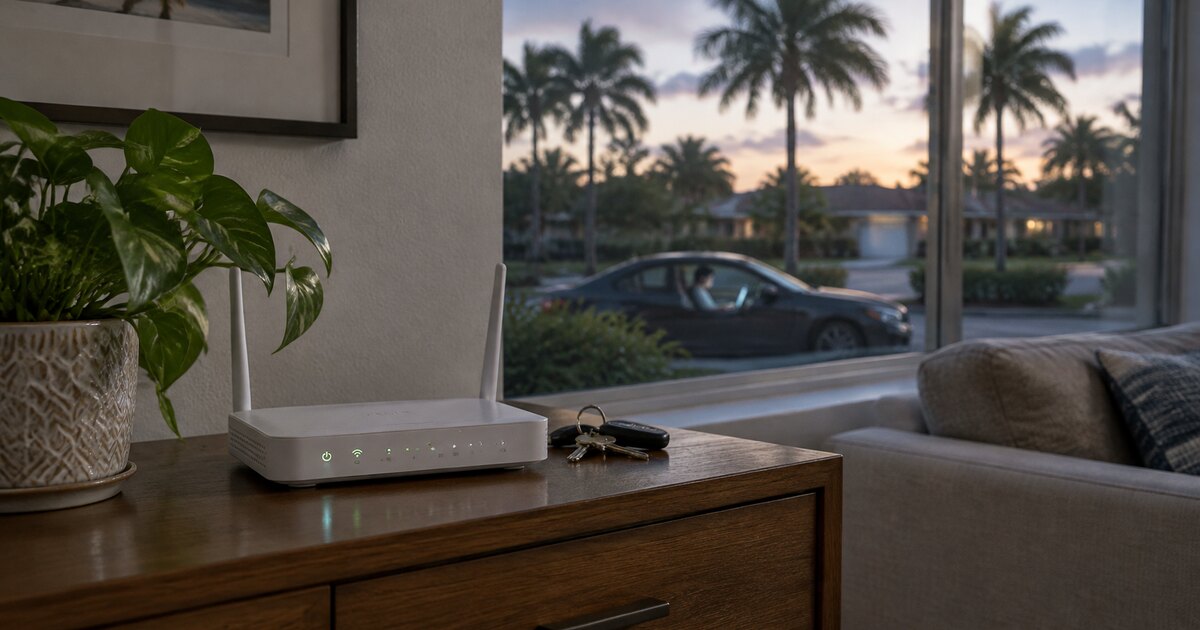
Yes. Someone can hack your Wi-Fi without knowing your password, but in most homes it takes a weakness you can fix. An attacker within range can record a small piece of your network's sign-in traffic and guess a weak password offline, abuse the WPS push-button or PIN feature, exploit an outdated router, or set up a look-alike network that tricks your devices—or you—into connecting. An attacker anywhere in the world can also break into the router itself through remote management or unpatched software, which never involves the Wi-Fi password at all. A modern, updated router using WPA3 or WPA2-AES with a long, unique passphrase, WPS turned off and remote administration disabled defeats nearly all of these methods.
This original guide explains each method in plain English, how realistic it is for a typical household or small office, the signs to watch for and the exact settings that close each door. It describes how attacks work at a high level so you can defend against them; it is not a how-to for breaking into networks, which is illegal without permission. Sources were reviewed November 27, 2026. This is security education, not legal advice.
Quick Answer: 9 Ways Someone Can Get Into Wi-Fi Without Being Given the Password
- 1Guessing a weak password offline after capturing sign-in traffic from nearby.
- 2Abusing WPS, the push-button or 8-digit PIN shortcut for joining a network.
- 3Using a default Wi-Fi or admin password that was never changed.
- 4Attacking the router from the internet through remote management or unpatched firmware.
- 5Exploiting flaws in Wi-Fi itself on devices that have not been updated.
- 6Setting up an “evil twin” network that imitates yours or a public hotspot.
- 7Coming in through a device already on your network, such as an infected gadget or computer.
- 8Getting the password from a person, a shared QR code, a synced device or an old guest.
- 9Connecting to a network that is open or still uses outdated WEP or WPA security.
Only the first two are true “cracking” of a home network from the sidewalk, and both are preventable. The rest go around the password entirely—which is why a strong password alone is not the whole answer.
How Close Does Someone Need to Be?
For most Wi-Fi attacks, the person must be within radio range of your router or your device. According to CISA's guidance on securing wireless networks, the typical indoor broadcast range of an access point is 150–300 feet, and outdoors it may extend as far as 1,000 feet. CISA notes that in closely settled neighborhoods, apartments and condominiums, that range can put your signal within reach of many unintended users, and it describes “wardriving”—driving through neighborhoods with a wireless-equipped computer, sometimes with a powerful antenna, searching for unsecured networks.
In practical terms, a neighbor, someone in a parked car, or a person in the next unit of a condo tower is close enough. Attacks on the router itself are different: if the router's management page or a vulnerable service is reachable from the internet, distance does not matter.
Method 1: Capturing Sign-In Traffic and Guessing the Password Offline
On WPA2-Personal networks—still the most common home setup—devices prove they know the password through a short exchange with the router. Someone nearby can record that exchange without connecting to anything. They do not learn the password from it directly, but they can take the recording home and test guesses against it on fast hardware, with no lockout and no alert on your side.
In 2018, the developers of the password-recovery tool hashcat published a variation that made this easier. They reported that the needed data could be requested straight from many routers, so the attacker no longer had to wait for one of your devices to sign in—what they called a “client-less” attack (hashcat forum). The researchers said they expected it to work against most modern routers with roaming features enabled.
What this means for you
- The attacker still has to guess the password. A short, common or pattern-based password (a phone number, an address, a pet's name plus a year) can fall quickly.
- A long, random passphrase is not practical to guess. Aim for at least 16 characters or four to five unrelated words.
- You will not see this happen. Nothing appears in your router's device list until the attacker actually joins.
- WPA3 changes the math. The Wi-Fi Alliance says WPA3-Personal gives users increased protections from password-guessing attempts.
Method 2: Abusing WPS (Wi-Fi Protected Setup)
WPS lets a device join by pressing a button on the router or entering an 8-digit PIN instead of the Wi-Fi password. It is convenient—and it is a way in that skips the password completely. CISA's home network security guidance explains that a design flaw in the WPS PIN method significantly reduces the time needed to brute-force the whole PIN, because the router reveals when the first half of the eight digits is correct, and that many routers lack a proper lockout policy after failed attempts. CISA's recommendation is direct: disable WPS.
The button method has a simpler problem. Anyone who can physically touch the router for a few seconds—a visitor, contractor, cleaner or short-term rental guest—can add a device without ever learning the password.
Method 3: Default Passwords That Were Never Changed
Many routers ship with a Wi-Fi password and an administrator password printed on a sticker. Anyone who has seen or photographed that sticker has both. Some older models also used predictable default network names and admin logins shared across thousands of units. CISA advises changing the router's default administrator password and adjusting factory-default settings because they are designed for convenience, not security.
The admin password matters as much as the Wi-Fi password. A guest who is on your Wi-Fi legitimately can open the router's settings page, sign in with the default admin login, read the Wi-Fi password, add their own access or change where your internet traffic is sent. Our step-by-step guide shows how to change your router password on common brands.
Method 4: Attacking the Router From the Internet
This is the method most people never consider, because it has nothing to do with Wi-Fi signals. Your router is a small computer connected directly to the internet. If it has a remote-management feature switched on, or it runs old software with known flaws, an attacker can take control of it from another country—and then see or change everything about your network, including the Wi-Fi password.
In May 2025 the FBI warned that criminals were exploiting end-of-life routers—models the manufacturer no longer updates—and that some with remote administration turned on had been compromised by a new variant of TheMoon malware, which let criminals route their own activity through victims' routers (FBI IC3). The FBI's recommended precautions were to replace end-of-life routers, apply available firmware updates, disable remote management and reboot, and use strong, unique passwords. It listed overheating, connectivity problems and settings the owner does not recognize as common signs of router malware.
Method 5: Flaws in Wi-Fi Itself on Unpatched Devices
Occasionally researchers find weaknesses in the Wi-Fi standards or in how devices implement them. These let someone in range interfere with or read traffic without the password.
- KRACK (2017): researchers showed that an attacker within range could use key reinstallation attacks to read information previously assumed to be safely encrypted on WPA2 networks. They noted the attack does not recover the Wi-Fi password and that devices can be patched in a backwards-compatible way (krackattacks.com).
- Dragonblood (2019): the same research group found that, under certain conditions, an attacker within range could still recover the password of a WPA3 network, and published the findings so vendors could mitigate them (Dragonblood).
- FragAttacks (2021): a collection of flaws, three of them design flaws in the Wi-Fi standard, which the researcher said affect all modern Wi-Fi security protocols including WPA3; experiments indicated every Wi-Fi product tested was affected by at least one (fragattacks.com).
These are fixed through software updates to routers, phones, computers and smart devices. The lesson is not that Wi-Fi is hopeless; it is that an un-updated router or gadget stays vulnerable to problems the rest of the world patched years ago. The FragAttacks researcher also advises making sure websites use HTTPS, which keeps the contents of your browsing encrypted even if the Wi-Fi layer fails.
Method 6: Evil Twin and Look-Alike Networks
Instead of breaking into your network, an attacker can invite you into theirs. CISA describes an evil twin attack as an adversary gathering information about an access point, impersonating it and broadcasting a stronger signal so that unsuspecting users connect to the attacker's system instead. Because the victim's traffic then flows through the attacker's equipment, it can be monitored.
At home, the more common version is social: your devices are briefly knocked off Wi-Fi, a network with your name appears without a lock icon, and a page asks you to “re-enter your Wi-Fi password to continue” or “update your router.” A real router never asks for the Wi-Fi password in a web page. If you type it, you have handed it over.
Method 7: A Device That Is Already Inside
An attacker does not need your Wi-Fi password if something they control is already connected. A computer with remote-access malware, a phone with a malicious app or a cheap smart gadget can all act as a foothold. In June 2025 the FBI warned that millions of low-cost streaming boxes, digital projectors, picture frames and similar devices had been compromised as part of the BADBOX 2.0 botnet, in some cases before the buyer even opened the box (FBI IC3).
The NSA's home network guidance recommends separating networks so that less-trusted devices cannot reach more sensitive ones. If you suspect a computer rather than the router, see how to tell if someone is remotely accessing your computer.
Method 8: Getting the Password From People and Shared Devices
- It was shared once and never changed: former roommates, an ex-partner, house sitters, contractors, short-term rental guests.
- It is on display: a sticker on the router, a note on the fridge, a QR code framed in the hallway or visible in a photo posted online.
- It syncs: phones and laptops can share saved Wi-Fi passwords with nearby contacts or through cloud backups, so a compromised email or cloud account may expose it.
- It can be read from any signed-in computer: someone with a few minutes on an unlocked laptop can view saved Wi-Fi passwords in its settings.
- It was reused: if your Wi-Fi password is also a website password that leaked in a data breach, it is on guessing lists.
None of this is technical hacking, and it is the most common way an unwanted person ends up on a home network. The fix is to change the password whenever the list of people who should have it changes, and to put visitors on a separate guest network.
Method 9: Open Networks and Outdated WEP or WPA
A network with no password is open to anyone in range. CISA warns that unintended users of an unsecured network may be able to conduct illegal activity, monitor and capture your web traffic, or steal personal files. Networks still set to WEP or the original WPA are only slightly better; CISA states that WPA3 is currently the strongest encryption and advises using equipment that specifically supports it, because the older protocols could leave your network open to exploitation.
Is WPA3 Unhackable? WPA2 vs. WPA3 in Plain English
No security setting is unhackable, but WPA3 removes the easiest path. With WPA2-Personal, anyone nearby can collect what they need to test password guesses offline. WPA3-Personal is designed so that guesses have to be made against the live network one at a time, which is slow and noticeable. The Wi-Fi Alliance states that WPA3 is mandatory for Wi-Fi CERTIFIED devices, disallows outdated legacy protocols and requires Protected Management Frames, which make it harder to forcibly disconnect your devices.
- Best: WPA3-Personal only, if every device you own supports it.
- Good: WPA2/WPA3 mixed (“transition”) mode. Newer devices get WPA3; older ones still connect with WPA2, so a strong passphrase remains essential.
- Acceptable: WPA2-Personal with AES and a long, random passphrase.
- Replace or reconfigure: WEP, the original WPA, WPA2 with TKIP only, or no password.
If your router offers nothing newer than WPA2 and no longer receives updates, it is time for a new one. See our picks for the best Wi-Fi routers for home security and privacy.
Get the 10-step Cyber Hardening Checklist
The exact steps our Miami team uses to lock down people and small businesses — takes under an hour. Instant access, no call required.
How to Tell If Someone Is on Your Wi-Fi Right Now
- 1Open your router's app or settings page and review the list of connected devices. Match each one to something you own; rename the ones you recognize.
- 2Look for settings you did not change: a new admin user, remote management switched on, port forwarding rules, or unfamiliar DNS server addresses.
- 3Check the router's firmware version and whether the manufacturer still supports the model.
- 4Watch for unexplained slowdowns, data-usage spikes, a hot router, or devices being disconnected repeatedly.
- 5Notice a second network with your exact name, especially one without a lock icon.
For a full walkthrough, read how to tell if someone is using your Wi-Fi and how to know if your home Wi-Fi is hacked.
How to Stop It: The 12-Step Wi-Fi Lockdown
- 1Set security to WPA3-Personal, or WPA2/WPA3 mixed mode if older devices need it. Never WEP or open.
- 2Create a new Wi-Fi passphrase of at least 16 characters that you use nowhere else.
- 3Turn off WPS, both PIN and push-button.
- 4Change the router's administrator password to a unique one and store it in a password manager.
- 5Turn off remote management/remote administration unless you have a specific, protected need for it.
- 6Update the router's firmware and switch on automatic updates. Replace the router if it is end-of-life.
- 7Create a guest network for visitors and a separate one for smart-home devices, with access to your main devices blocked.
- 8Turn off UPnP and remove port-forwarding rules you do not recognize or need.
- 9Give the network a neutral name that does not reveal your surname, unit number or router brand.
- 10Remove unknown devices, then change the Wi-Fi password so they cannot rejoin.
- 11Keep phones, computers, TVs and smart devices updated, and avoid off-brand gadgets with no update history.
- 12Review the device list and router settings a few times a year and after any guest, tenant or contractor leaves.
Hiding your network name and filtering devices by MAC address are sometimes suggested, but neither stops a determined attacker and both add hassle; treat them as optional extras, not protection. A complete version of this setup is in our guide to securing home Wi-Fi.
What to Do If You Think Your Wi-Fi Was Hacked
- 1From a wired computer or a device you trust, sign in to the router and note anything unfamiliar: devices, admin users, DNS settings, port forwards, remote access.
- 2Update the firmware. If you suspect the router itself was compromised, perform a factory reset and set it up again from scratch rather than restoring an old settings backup.
- 3Set a new admin password, a new Wi-Fi passphrase, WPA3 or WPA2-AES, WPS off and remote management off.
- 4Reconnect your own devices one at a time. Leave questionable gadgets off the network.
- 5Change passwords for email, banking and cloud accounts from a clean device and turn on multi-factor sign-in.
- 6Scan computers and phones for malware and remove remote-access tools you did not install.
- 7If money, accounts or safety are involved, save screenshots and notes, report to your bank and to the FBI's Internet Crime Complaint Center at ic3.gov, and get professional help.
Home Offices and Small Businesses: Why the Stakes Are Higher
If client files, payroll, patient information or payment systems touch your Wi-Fi, an intruder on the network is a business incident, not a nuisance. In 2024, security firm Volexity described what it named the “Nearest Neighbor Attack”: a Russian state-linked group, operating from thousands of miles away, breached an organization by first compromising other organizations in nearby buildings and then connecting to the target's Wi-Fi from across the street. Volexity reported that the target's internet-facing services required multi-factor authentication, but its Wi-Fi only required a valid username and password (Volexity).
A household is not a nation-state target, but the principle carries over: Wi-Fi is a doorway into everything behind it, and it deserves the same protection as your email. Keep work devices on their own network, away from guests, children's devices and smart-home gadgets. See home network security in South Florida and business network security in Miami.
Is It Illegal to Access Someone's Wi-Fi Without Permission?
In Florida, Section 815.06 of the Florida Statutes makes it an offense to willfully, knowingly and without authorization access a computer, computer system, computer network or electronic device knowing the access is unauthorized. Federal law also addresses unauthorized access to computers. Testing Wi-Fi security is lawful only on networks you own or have written permission to test—which is how professional ethical hacking engagements are run. If you believe a specific person is accessing your network, document what you see and speak with law enforcement or an attorney rather than retaliating.
Wi-Fi Risks in Miami and South Florida
- High-rise condos and apartments: dozens of neighbors sit inside your signal range, and building-provided Wi-Fi may be shared more widely than you expect.
- Short-term rentals and seasonal homes: every guest has had the password and physical access to the router. Reset both between stays.
- ISP-supplied routers: often left on default settings for years. Check the security mode, WPS and admin password even if “the cable company set it up.”
- Storm season: after power cuts and equipment swaps, routers can come back on factory defaults or with older firmware.
- Smart-home heavy properties: cameras, locks and gate controllers raise the cost of a Wi-Fi intrusion. See the $10 million smart home problem.
When to Get Professional Help
Most households can complete the 12 steps above in under an hour. Bring in a professional when unknown devices keep returning after a password change, router settings change on their own, you work from home with sensitive data, someone with a personal motive may be targeting you, or the property has many connected devices and several people with access. Cybrvault's home network security and personal cybersecurity services cover Miami and South Florida, and you can start with our free cyber risk calculator or contact us directly.
Sources
- CISA: Securing Wireless Networks
- CISA: Home Network Security
- NSA: Best Practices for Securing Your Home Network (Feb. 2023)
- FBI IC3: Cyber Criminal Proxy Services Exploiting End of Life Routers (May 7, 2025)
- FBI IC3: Home internet connected devices facilitate criminal activity—BADBOX 2.0 (June 5, 2025)
- Wi-Fi Alliance: Security (WPA3, Protected Management Frames)
- hashcat: New attack on WPA/WPA2 using PMKID (Aug. 2018)
- KRACK Attacks: Breaking WPA2 (2017)
- Dragonblood: Analysing WPA3's Dragonfly Handshake (2019)
- FragAttacks: Security flaws in all Wi-Fi devices (2021)
- Volexity: The Nearest Neighbor Attack (Nov. 22, 2024)
- Florida Statutes § 815.06: Offenses against users of computers, computer systems, computer networks, and electronic devices
// frequently asked
Questions teams ask us
Can someone hack your Wi-Fi without knowing your password?+
Yes. A person within range can capture sign-in traffic and guess a weak password offline, abuse WPS, or use an evil twin network to trick you. Someone anywhere can attack an outdated router or one with remote management turned on. A strong passphrase, WPA3 or WPA2-AES, WPS off, remote management off and current firmware stop nearly all of these.
Can someone hack my Wi-Fi remotely, from far away?+
They cannot reach your Wi-Fi signal from far away, but they can attack the router itself over the internet if remote administration is enabled or the firmware is outdated. The FBI warned in 2025 that end-of-life routers with remote administration turned on were being compromised with malware.
Can my neighbor hack my Wi-Fi?+
A neighbor is within range, so the nearby methods apply: guessing a weak password, WPS, or simply having been given the password once. CISA says indoor Wi-Fi typically reaches 150–300 feet. Use a long unique passphrase, disable WPS and change the password if anyone who had it should no longer have access.
Is WPA2 still safe in 2026?+
WPA2-Personal with AES and a long, random passphrase is still acceptable, but it allows offline password guessing, so weak passwords are at risk. WPA3 is stronger, and CISA advises using equipment that supports WPA3. Avoid WEP, the original WPA and TKIP-only settings.
Can WPA3 be hacked?+
WPA3 is much harder to attack because it is designed to resist offline password guessing. Researchers found flaws in early WPA3 implementations in 2019 (Dragonblood) and in Wi-Fi generally in 2021 (FragAttacks), which were addressed with updates. Keeping the router and devices updated is what keeps WPA3 strong.
Should I turn off WPS on my router?+
Yes. CISA recommends disabling WPS because a design flaw in the PIN method makes it much faster to brute-force, and many routers do not lock out repeated attempts. The push-button method also lets anyone with brief physical access add a device.
How long should my Wi-Fi password be?+
Use at least 16 characters, or four to five unrelated words, and do not reuse it anywhere else. Avoid names, addresses, phone numbers and dates. Length and unpredictability are what defeat offline guessing.
Does hiding my Wi-Fi name (SSID) stop hackers?+
No. A hidden network can still be detected by anyone looking for it, and hiding it can cause connection problems. Use a neutral network name that does not identify you, and rely on WPA3 or WPA2-AES with a strong passphrase instead.
If someone is on my Wi-Fi, what can they see or do?+
They may be able to see which devices are on the network, reach shared files, printers, cameras and smart-home devices, try default logins on the router and other equipment, and use your connection for their own activity. Most website traffic is protected by HTTPS, but an intruder who controls the router can redirect you to fake sites.
How do I kick someone off my Wi-Fi?+
Sign in to the router, change the administrator password, then change the Wi-Fi passphrase and disable WPS so the device cannot rejoin. Update the firmware, turn off remote management and reconnect only your own devices. If unknown devices return, factory-reset the router or get professional help.
Is it illegal to use someone's Wi-Fi without permission?+
It can be. Florida Statute 815.06 makes it an offense to knowingly access a computer network without authorization, and federal law also covers unauthorized access. Only test or use networks you own or have permission to use.
Can Cybrvault check whether my home Wi-Fi is secure?+
Yes. Cybrvault's Home Wi-Fi Security Check reviews your router, Wi-Fi settings and connected devices for homes, condos and home offices across Miami and South Florida, removes unknown access and hardens the setup. Book at cybrvault.com/contact or call (305) 988-9012.
Cybrvault · Home Network Security
5.0 on Google
You changed the password. Is that really enough?
Most of the ways into a Wi-Fi network never touch the password. Cybrvault's Home Wi-Fi Security Check puts a Miami-based security engineer on your router, settings and connected devices to find the open doors—then closes them, so you know exactly who and what is on your network.
Router & Wi-Fi settings audit
Security mode, passphrase strength, WPS, remote management, firmware and admin access checked against current CISA, NSA and FBI guidance.
Every connected device identified
Phones, TVs, cameras and gadgets matched to their owners. Anything unknown is investigated and removed—not just blocked.
Lockdown done for you
New credentials, WPA3 where supported, guest and smart-home networks separated, risky features switched off and updates turned on.
Plain-English report
What we found, what we fixed and what to watch, plus simple house rules for family, guests and anyone who works in your home.
- 01
Quick call
Tell us what you're seeing. We confirm the scope and whether a remote or on-site visit fits best.
- 02
Check & fix
A Cybrvault engineer reviews the router, Wi-Fi and devices, then hardens the setup with you.
- 03
Report & support
A written summary, follow-up questions answered and optional 24/7 monitoring.
- For homes, condos, home offices and short-term rentals across Miami and South Florida
- Ideal when unknown devices appear, after a move, breakup, tenant or contractor, or when you work from home with client data
- Works with the router you have, including ISP-supplied equipment—and we tell you honestly if it needs replacing
Paid work begins with a written proposal and signed agreement, followed by an invoice—not an online checkout. Scope, confidentiality terms and pricing are confirmed in writing before any work starts. Testing happens only on systems you own or are authorized to approve. Billing terms.
// miami, fl services
Cybersecurity built for South Florida
// keep reading
Related articles
Personal Security
The $10 Million Smart Home Problem: How Luxury Properties Become Cybersecurity Targets
Why luxury smart homes attract hackers and burglars, the weak points hidden in high-end home automation, and a practical plan to secure an estate in 2026.
Personal Security
How to Tell If Someone Is Remotely Accessing Your Computer in 2026
Signs someone is remotely accessing your computer, how to check Windows 11 and Mac for remote sessions, and exactly what to do in the first 15 minutes.
Personal Security
15 Ways People Get Hacked in 2026 (and How to Stop Each One)
The 15 most common ways people get hacked in 2026, from phishing and SIM swaps to AI voice scams, with warning signs, fixes, and a 10-minute checklist.
Under attack right now? Our 24/7 line responds immediately.